
Hey Switch
Notion Recommended Creator
Thursday, April 10, 2025
Hey there! If you're like me, juggling work, personal commitments, and everything in between, you know how crucial it is to have a reliable planning system. Enter the Notion weekly planner. This powerhouse tool is designed to seamlessly integrate into your life, helping you keep track of tasks, appointments, and more. It's not just about ticking off to-dos; it's about enhancing productivity and freeing up mental space for what truly matters. Whether you're a seasoned Notion user or just getting started, this planner can transform how you organize your week. Ready to dive in and explore its magic? Let's get started!
What is a Notion Weekly Planner Template?
A Notion weekly planner template is a digital planning tool designed to help you organize your week efficiently within the Notion app. Its primary purpose is to streamline your task management, scheduling, and goal setting, all in one place. Imagine having a personal assistant that keeps track of your appointments, deadlines, and priorities—this is what a Notion weekly planner offers.
Integrating seamlessly with Notion, this planner leverages Notion's powerful database capabilities to enhance productivity. You can easily drag and drop tasks, set reminders, and even link to other Notion pages. The real beauty lies in its customization: whether you prefer a minimalist layout or a detailed schedule, the planner adapts to your style. Plus, by syncing across all your devices, it ensures you have access to your plans anytime, anywhere. For those looking to boost efficiency and stay organized, a Notion weekly planner is a game-changer. Discover more about its features here.
Features of the Notion Weekly Planner Template
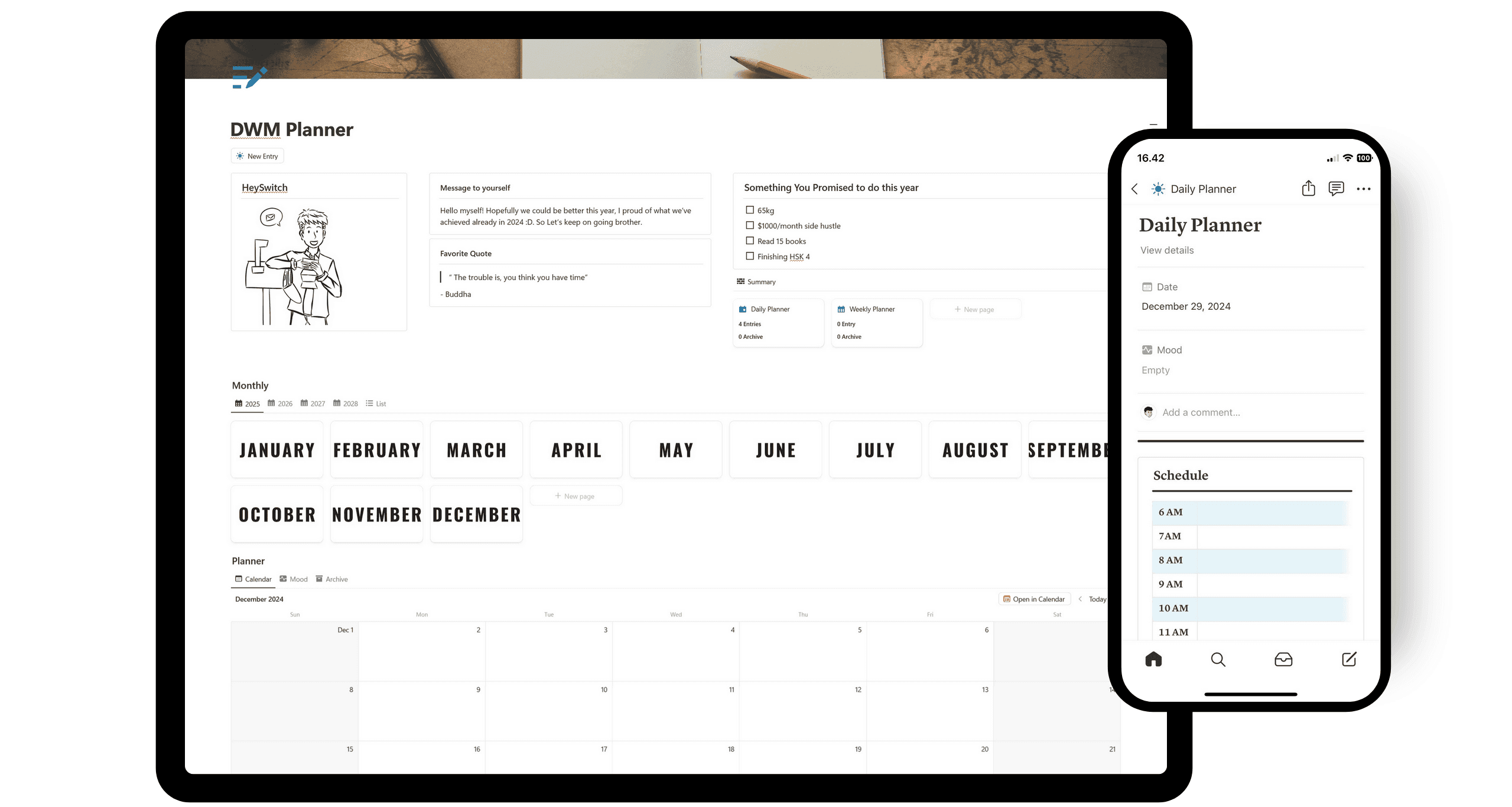
The Notion Weekly Planner Template is packed with features that make organizing your week a breeze. Let's dive into what makes this template a standout choice:
Customizable Layout: One of the greatest strengths of this planner is its flexibility. You can tailor the layout to suit your needs, whether you prefer a simple overview or a detailed schedule. This personalization ensures the planner fits seamlessly into your workflow.
User-Friendly Interface: The design is intuitive, making it easy for both newbies and seasoned Notion users to navigate. The clean interface helps you focus on what's important without getting overwhelmed by unnecessary details.
Integration with Notion's Tools: Leveraging Notion's robust database capabilities, this planner allows you to link tasks, set reminders, and sync with other Notion pages. This integration enhances productivity by keeping everything interconnected and accessible.
Cross-Platform Accessibility: Access your planner from any device, ensuring your plans are always at your fingertips. This feature is crucial for busy professionals and students who are always on the go.
Looking for more insights into the benefits of using Notion planners? Check out this guide for a deeper dive into how these features can boost your organization. With such a comprehensive set of tools, the Notion Weekly Planner Template by HeySwitch is an invaluable asset for anyone looking to streamline their planning process.
Benefits of Using a Notion Weekly Planner
Using a Notion weekly planner offers remarkable benefits for both personal and professional organization, making it a go-to tool for many. Let's explore how it can transform your routine:
Enhanced Time Management: By centralizing tasks and appointments, the planner helps you allocate time efficiently. You can easily visualize your week, preventing overcommitment and ensuring a balanced schedule.
Habit Tracking: Maintaining good habits becomes easier with integrated tracking features. You can monitor daily routines and gain insights into your progress, which encourages consistency and improvement.
Goal Setting: The planner’s goal-setting tools keep you focused. You can define objectives, break them into actionable steps, and track your achievements. This approach boosts motivation and ensures steady progress toward your aspirations.
Comprehensive Organization: Notion’s flexibility allows you to customize the planner to fit your lifestyle. Whether it's color-coding tasks or setting reminders, the adaptability of the Notion weekly planner is a significant advantage.
Seamless Integration: For those who thrive on connectivity, the planner syncs across all devices. This means you have access to your plans wherever you are, ensuring nothing slips through the cracks.
By leveraging these features, a Notion weekly planner becomes more than just a schedule—it’s a personal productivity powerhouse. For a detailed setup, you can explore this step-by-step guide to tailor your planner to your needs.
How to Set Up Your Notion Weekly Planner
Getting your Notion weekly planner up and running is a breeze, and customizing it to fit your style makes planning even more enjoyable. Here’s how you can set it up:
Choose a Template: Start by selecting a Notion weekly planner template that suits your needs. You can explore various options and decide which layout and features resonate with you. You can choose our template or these collections to start.
Import the Template: Once you've chosen your template, import it into your Notion workspace. Click on the "Duplicate" button, and it will be added to your dashboard.
Customize Your Layout: Tailor the planner to your needs by adjusting the sections. Whether you want a minimalist look or a detailed overview, tweak the layout until it feels just right.
Add Personal Touches: Insert your tasks, appointments, and goals. Use different colors or icons to categorize items, making it visually appealing and easy to navigate.
Set Reminders and Links: Leverage Notion’s tools by adding reminders for deadlines and linking related pages. This integration keeps everything connected and easily accessible.
Sync Across Devices: Ensure your planner is synced across all your devices. This way, you’ll have your plan at your fingertips, no matter where you are.
By following these steps, your Notion weekly planner will become a personalized hub for organizing your life. Enjoy the process, and don’t hesitate to tweak as you go along.
Tips for Maximizing Productivity with a Notion Weekly Planner
Boosting your productivity with a Notion weekly planner is all about making it work for you. Here’s how you can get the most out of it:
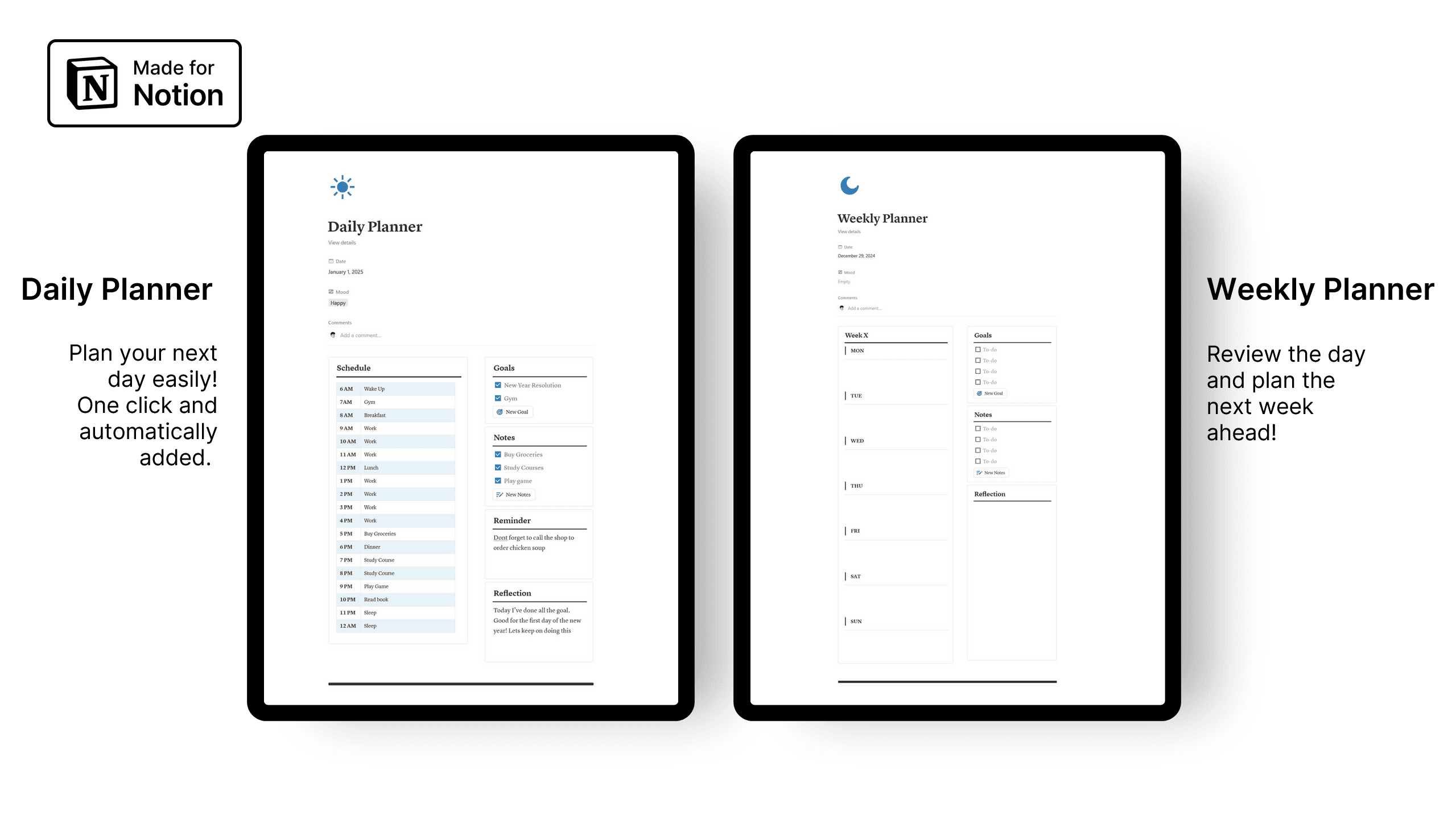
Start Every Day with a Plan: Begin your morning by reviewing your weekly planner. Identify the top three tasks you need to accomplish. This helps set a clear focus for the day.
Prioritize Wisely: Use the Eisenhower Box method to decide what’s urgent and important. This will ensure you're not just busy but productive.
Batch Similar Tasks: Group similar tasks together. If you're writing emails, do them all at once. It keeps you in the same mindset and increases efficiency.
Leverage Notion's Features: Use tags and filters to categorize tasks by priority or project. This makes it easier to find what you need and reduces overwhelm.
End with a Review: At the end of each day, reflect on what you achieved. Adjust your goals for the next day. This habit keeps you on track and motivated.
By personalizing your Notion weekly planner and using these tips, you'll transform your planning into a productivity powerhouse!
Alternatives to Notion Weekly Planner Templates
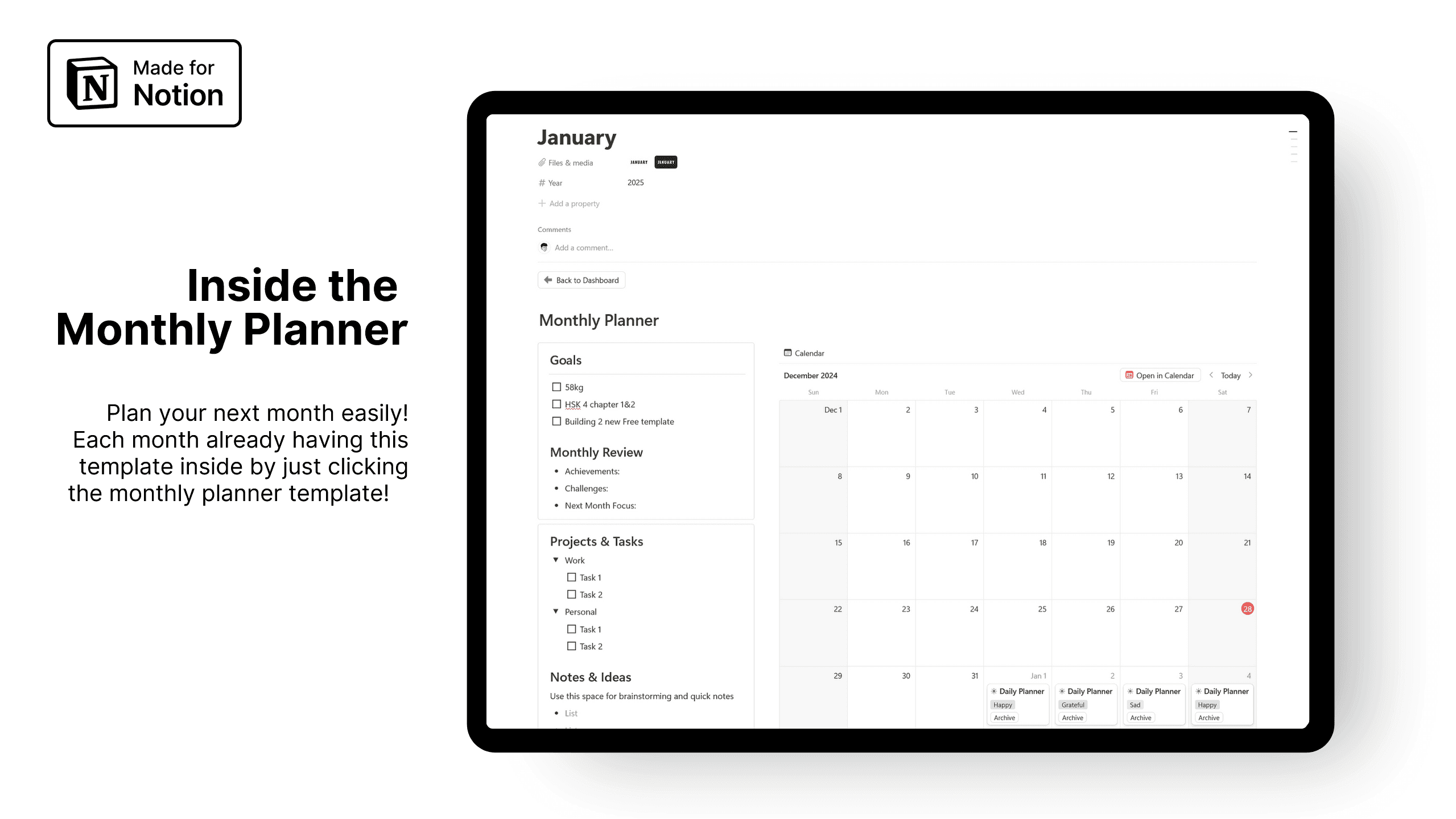
If you're exploring alternatives to the Notion weekly planner, there are plenty of digital and analog options worth considering. Let’s dive into some and explore their pros and cons compared to Notion templates.
Digital Planners: Popular apps like Google Calendar and Todoist offer robust scheduling and task management. They're great for syncing across devices and often come with integrations that enhance productivity. However, they lack the deep customization that a Notion weekly planner provides. You might miss out on the tailored experience that makes planning more personal.
Analog Planners: There's something charming about paper planners like the Bullet Journal or the Passion Planner. They offer a tactile experience and can be highly creative. Plus, writing by hand can improve memory retention. On the downside, they aren't as easily accessible on-the-go and lack the digital convenience of reminders or syncing features.
While digital planners offer convenience and analog ones provide a personal touch, the Notion weekly planner stands out with its ability to combine both worlds—providing a customizable, integrated experience that adapts to your unique needs.
Related Templates by HeySwitch
Heyswitch offers a treasure trove of templates that can make your planning and organization smoother. Beyond the Notion weekly planner, there are several other popular templates that cater to different needs and preferences. Let's dive into a few favorites:
Second Brain Template: Designed to optimize your personal and professional life, this template helps you manage tasks, habits, projects, and more with ease. Whether you're aiming to enhance your knowledge management or achieve balance across various life areas, this template is your blueprint for success.
Goal Tracker Template: Designed to streamline your path to success, this template empowers you to set, monitor, and conquer your aspirations with ease. Whether you're striving for professional growth, personal development, or both, Thrive & Strive goal tracker is your roadmap to realizing your dreams.
Task Management Template: Designed to simplify your life, this template offers a straightforward approach to organizing your tasks. From capturing ideas in your inbox to prioritizing your daily agenda and tackle it to finish, it's your all-in-one tool for staying focused and on track. Plus, it's customizable to fit your unique workflow! Say goodbye to overwhelm and hello to productivity, one task at a time.
Using these templates alongside your Notion weekly planner can create a comprehensive system tailored to your lifestyle. Whether you're a student, a professional, or someone focused on personal growth, Notion Nifties has a template to support you.
After exploring the ins and outs of the Notion Weekly Planner Template by HeySwitch, you've seen how it can transform your planning process with its customizable layouts, integrated habit tracking, and user-friendly interface. Imagine setting up your week with ease, tracking your goals, and accessing your planner across all your devices. It's time to take control of your schedule and boost your productivity. Ready to experience these benefits firsthand? Let's get you started on that journey. Get more done with our Notion templates and make your weekly planning a breeze!
notion weekly planner
Notion vs Evernote vs Obsidian (2026): Which Notes App Will You Actually Stick With?
Compare Notion, Evernote, and Obsidian in 2026: features, pricing, workflows, and who each app fits best using verified sources.
Feb 4, 2026
Top 12 Notion Second Brain Templates for 2025
Discover the 2025 Notion Second Brain template. Enhance productivity with new features, customization, and seamless integration. Transform your workflow today!
Jun 26, 2025
Top 12 Notion Dashboard Templates for 2025
Explore the 12 best Notion dashboard templates for 2025 to boost productivity and streamline tasks with customization and versatility. Discover your ideal fit today!
May 17, 2025